The Tive Mobile App: A Supply Chain Watchtower in Your Pocket
February 9, 2026
September 21, 2026
x min read
You're standing on a dock when you receive an alert about your shipment’s condition. You need details… but your visibility platform is on your desktop, and by the time you get back to it, "later" will mean too late.
This is the reality for most logistics professionals. You spend your days on warehouse floors, between facilities, and on calls with customers who want answers you can't access fast enough. The Tive mobile app changes all that by putting real-time shipment intelligence on the device that’s already in your pocket.
Get Shipment Status at a Glance
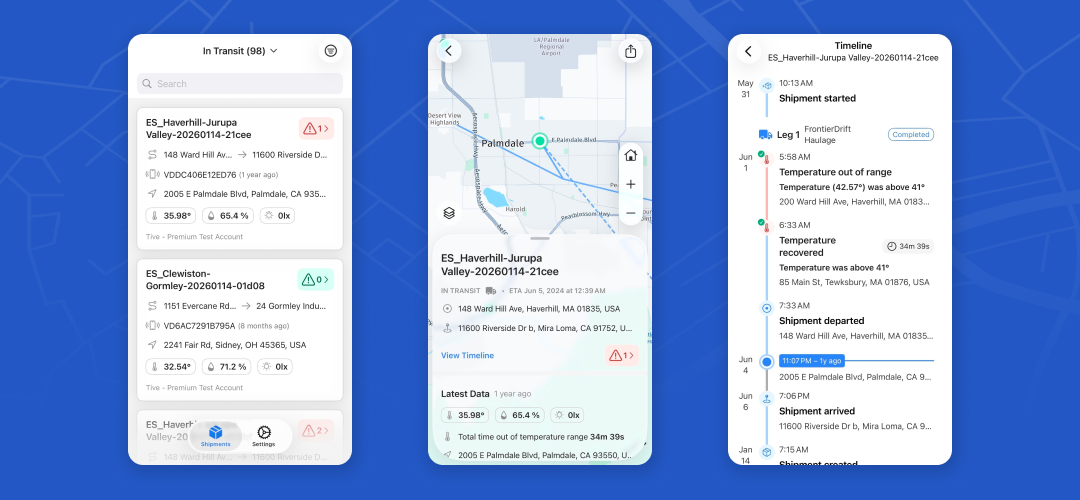
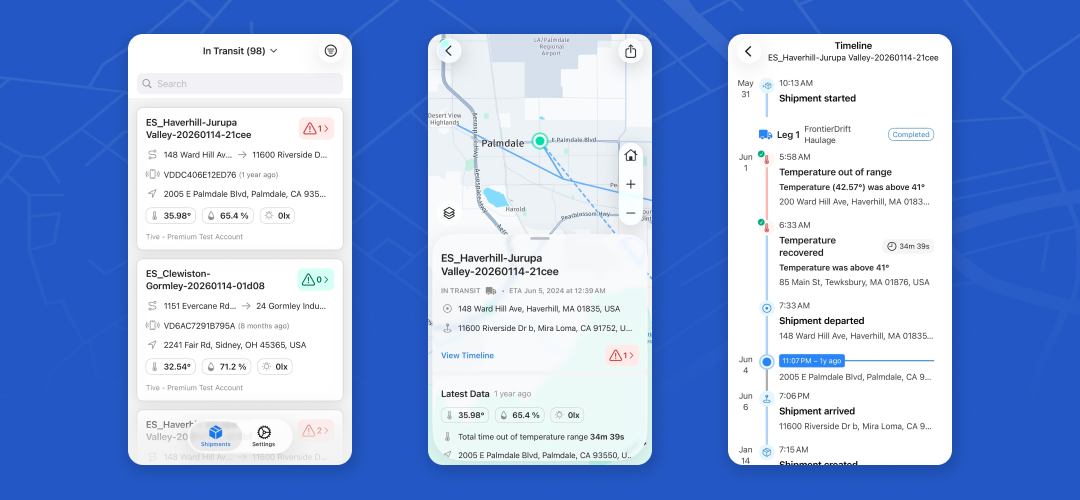
Using the app, you can pull up any shipment and see the essentials on one screen: last known location, latest sensor readings, alert counts and severity, tracker connectivity, and the key identifiers that confirm you're looking at the right load.
The next time a customer calls to ask about their freight while you're out of the office, you can open the app, verify location, check the last update, and see whether any readings are trending toward trouble. Seconds later, you can give them a confident answer and get back to work.
Get Alerts With Key Context
When an alert fires, you need more than a notification: you need to know whether it's a real problem or background noise. Most monitoring tools tell you something happened without telling you what it means, which leads to over-escalation, false alarm chasing, and alert fatigue.
The Tive mobile app builds context into every alert. Map views show exactly where an excursion occurred, whether inside a facility or mid-transit on an open highway. A brand new “shipment timeline” view reveals what else was happening at the time an alert was fired. A temperature spike at a distribution center carries different weight than one in an unmarked parking lot, and now you can tell the difference without running back to your desk.
Keep Your Team on the Same Page
Knowing what's happening only matters if your team is working off of the same information. That’s why we’ve made it easier than ever for shipment collaborators to view shipments on the Tive app. Now operations, quality, and customer service teams all see the same real-time data in the palm of their hand. Deeplinking lets you send a shipment link that opens directly in the app, dropping a teammate right into the details.
What's Coming Next in the App?
Push notifications are at the top of the roadmap. You'll receive alerts directly on your phone, with filters to control what gets through… so that only the highest-priority issues cause your phone to vibrate.
Get Started
About 20% of active Tive customers have already logged into the mobile app since launch, and we're just getting started. The Tive app is available now on the App Store and Google Play (search for "Tive," not "Tive Tag"). Access depends on your plan, so check your account or contact Tive to enable it for your team.
Your shipments move 24/7. Now you can keep up.